Does my business need an app or is a website enough in 2026?
Most Australian small businesses need a good mobile website first. Six yes-or-no questions show when an app is worth it, with the 2026 facts behind each.


The short answer
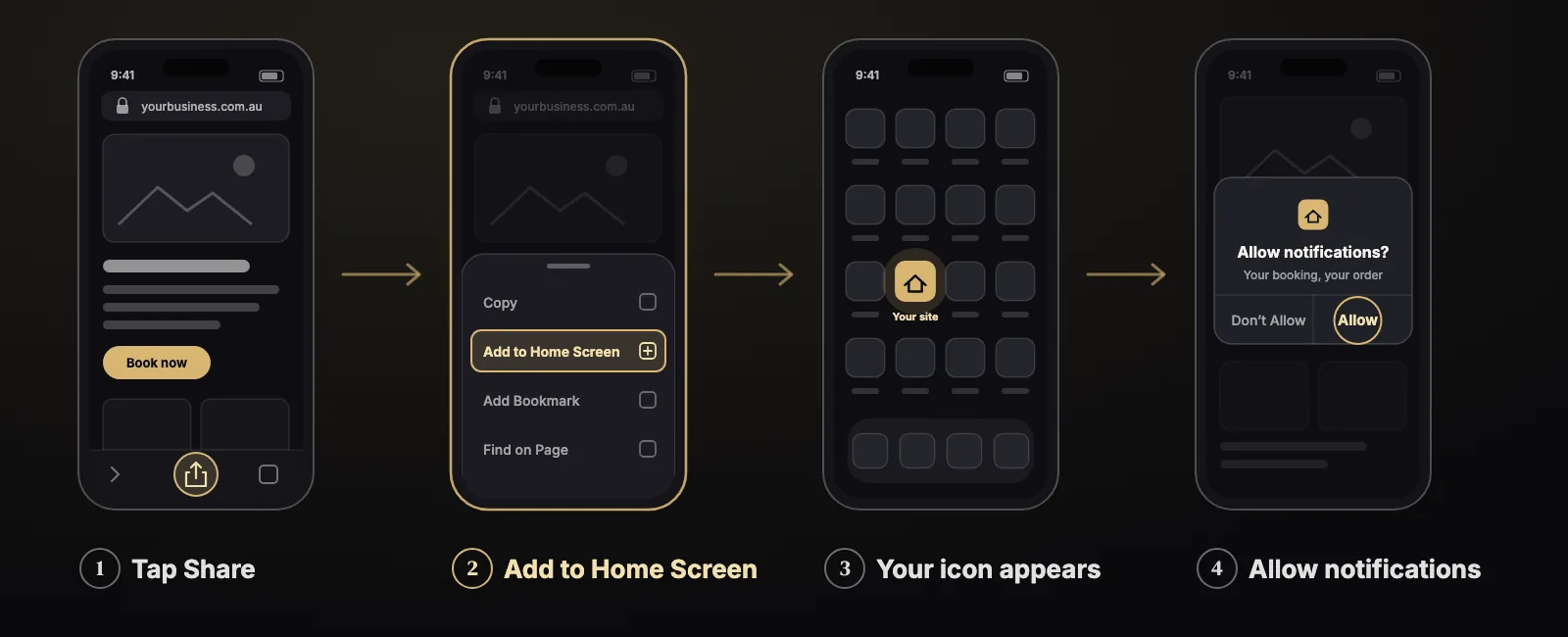
For most Australian small businesses, a good mobile website is enough to start. In 2026 a website can use the camera, take Apple Pay and card payments, work when the connection drops, and send notifications. A customer can add it to their home screen and open it like an app.
A store app, from the App Store or Google Play, is worth it in a few clear cases: customers who come back every week, notifications on iPhone that people will not set up themselves, phone hardware such as Bluetooth, or a business that must be found inside the stores. Six questions below tell you which side you are on.
Three ways onto a customer’s phone
Here is what the three options are, in one line each.
- A website (web app). It opens in the browser. Google finds it. Every change goes live the moment you publish it.
- A home-screen web app. The same website, with its own icon on the phone. It opens without the browser bar. The industry name is PWA, progressive web app. MDN, the reference most web developers use, describes it as an app “built using web platform technologies” that “can be installed on the device, can operate while offline and in the background” (MDN).
- A store app. Built for iPhone or Android and downloaded from a store. It gets full access to the phone, and it passes Apple’s or Google’s review before every release (Apple, Apple App Review).
Since iOS 26, which Apple released in September 2025, “every website added to the Home Screen opens as a web app” by default (WebKit, September 2025). That one change makes the middle option much easier on iPhone.
Walk through these six questions
Start at the first one. Each answer tells you where to go next.
1Do your customers use you every week?
NoA good mobile website
2Do you need notifications on iPhone, and will your customers not add you to the home screen?
YesLean towards a store app
3Do you need the camera or payments?
YesA website can do both. Go on.
4Do you need Bluetooth, other phone hardware, or heavy work with no internet?
YesStore app
5Must customers find you inside the App Store or Google Play?
YesStore app, if it does more than your website
NoWeb app or home-screen web app
6Was it built, or will it be built, with an AI app builder?
YesYou have a web app. Launch it as a website first.
1. Do your customers use you every week?
If not, stop here: a good mobile website is enough. People use about 34 apps a month and app downloads grew only 0.8% in 2025 (Sensor Tower, State of Mobile 2026). Asking someone to install one more app is a real cost to them. A café, a plumber or a clinic that people visit a few times a year is better served by a fast website.
If yes, go to question 2.
2. Do you need notifications?
On Android, a web app can send them. On iPhone, a website can send notifications only after the customer has added it to the home screen and tapped to allow them, a rule Apple set when it added web push in 2023 (WebKit, February 2023). About six in ten Australian phone visits to websites come from iPhones (Statcounter), so this rule matters here more than in most countries.
If “your order is ready” or “your booking is tomorrow” is the heart of the service, and your customers will not add you to the home screen, lean towards a store app. Otherwise, go to question 3.
- CameraPhotos, scans, video calls
- PaymentsApple Pay and saved cards
- Works offlineKeeps working when the signal drops
- NotificationsiPhone: after Add to Home Screen
- Home-screen iconOpens without the browser bar
- BluetoothNot in some of the most used browsers
3. Do you need the camera or payments?
A website can do both. Browsers have allowed camera access since 2017 (MDN). Safari supports Apple Pay on websites, and the Payment Request standard lets a customer pick a saved way to pay (Apple, MDN). On their own, these are not a reason to build a store app. Go to question 4.
4. Do you need Bluetooth, other phone hardware, or heavy work with no internet?
If yes, you need a store app. Web Bluetooth does not work in some of the most widely used browsers (MDN), and the advice of Nielsen Norman Group, the usability research firm, still holds: “A native app is best if your app must work when there is no connectivity” (NN/g).
If no, go to question 5.
5. Must customers find you inside the App Store or Google Play?
If yes, and the app will do more than your website, build a store app, and plan for the stores’ rules. Apple rejects apps that are not more than “a repackaged website” (rule 4.2) (Apple App Store Review Guidelines). Google Play does not allow an app that is only a view of a website (Google Play policy). Every update goes back through review (Apple App Review). A new personal Google Play account must run a closed test “with at least 12 opted-in testers continuously for 14 days” before the app can go public (Google Play Console Help).
If no, a web app or a home-screen web app is the better fit. Google search finds it, and nobody reviews your updates.
- BuildAn app for iPhone, Android, or both.
- ReviewApple: more than a repackaged website. Google: more than a view of a website.
- Closed testNew personal Google account: 12 testers for 14 days.
- LiveIn the store. People can find and download it.
↺ Every update goes back to review
6. Was it built, or will it be built, with an AI app builder?
Then you already have a web app. Lovable’s own help page answers the question “Can I make native apps?” with “Not as native apps” and offers two routes: a home-screen web app, or wrapping the site with another tool and submitting it to the stores (Lovable docs). Launch it as a website first. Wrap it for the stores later only if questions 2, 4 or 5 sent you there, because Apple’s rule 4.2.6 rejects apps from “app generation” services unless the content owner submits them (Apple).
The Australian numbers
97%of Australian adults went online with a mobile phoneACMA, February 2026 (2025 data)
6 in 10Australian phone web visits come from iPhonesStatcounter, September 2026
Halfof Australian web visits still come from computersStatcounter, September 2026
- 97% of Australian adults went online with a mobile phone in 2025, up from 95% the year before, and 92% used mobile internet every day (ACMA, February 2026).
- In September 2026, iPhones made up about 62.6% of Australian mobile web visits and Android about 37.4%. A year earlier it was closer to 55% and 44% (Statcounter, which counts visits, not phones owned).
- Desktop is not gone. In September 2026 Australian web visits were almost exactly half mobile (48.6%) and half desktop (48.5%) (Statcounter). A store app reaches only the phone half. A website reaches both.
Apps in 2025 and 2026: busy, but full
How many apps people useSensor Tower, State of Mobile 2026 (2025 data), average per person.
3.6 ha day spent in appsSensor Tower, 2025
0.8%growth in app downloads in 2025Sensor Tower, 2025
~150 bnapp downloads in the year, almost flatSensor Tower, 2025
People spent about 3.6 hours a day in apps in 2025, used about 34 different apps a month and about 10 a day, and downloads were almost flat at nearly 150 billion (Sensor Tower, State of Mobile 2026). For a small business, the question is not whether people use apps. It is whether they will make room for yours. My guess for 2027 is the same shape: the phone stays full, and the businesses that earn a place on it are the ones customers use every week.
What AI app builders changed
- AI builder makes a web appLovable and tools like it build for the browser.
- Launch as a website and a home-screen appGoogle finds it. Updates go live at once.
- Store app only if the questions say soQuestions 2, 4 or 5. Wrapped, and doing more than the website.
AI app builders made the web the normal starting point. If you built something with one, you have a web app, and the honest next step is to launch it as a website and a home-screen app, not to rush it into the stores. The learning video below shows where those apps usually get stuck, and how they get finished.
When the six questions do point to a store app, that is a build I do with my agent team, starting from the web app you already have where it makes sense.
Questions people ask
Is a PWA the same as an app?
For the customer it looks like one: its own icon, its own window, no browser bar. It is still a website underneath, so it is found by Google, not the stores, and every update goes live at once. On iPhone it can send notifications only after the customer adds it to the home screen.
Can a website send notifications to an iPhone?
Yes, since 2023, but only after the customer adds the site to the home screen and agrees to notifications. A plain website open in Safari cannot.
Will Apple accept my website as an app?
Not if it is just the website in a wrapper. Apple’s rule 4.2 asks for “features, content, and UI that elevate it beyond a repackaged website”, and Google Play does not allow an app that is only a view of a website.
I built my app with an AI builder. Can I put it in the App Store?
Usually not as it is. Builders like Lovable make web apps, and say so. Launch it on the web first. If you need the stores, the app has to be wrapped and must do more than the website, and Apple’s rule 4.2.6 applies to apps made by app generation services.
Start with a website that works beautifully on a phone, and build a store app only when one of the six questions sends you there. See how I can help or talk to me.
Have an app idea, a stuck app, or a daily job you want an AI agent to do?
Write three lines. I reply within one working day with a plain answer.
Sources. MDN, “Progressive web apps”, August 2026. WebKit, “Web Push for Web Apps on iOS and iPadOS”, 16 Feb 2023, and “WebKit Features in Safari 26.0”, 15 Sep 2025. MDN, getUserMedia, Push API, Payment Request API, Web Bluetooth. Apple, “Apple Pay on the Web”. Apple App Store Review Guidelines, 8 Jun 2026; Apple App Review. Google Play Console Help, testing requirements for new personal accounts; Google Play policies on functionality and spam. ACMA, 19 Feb 2026. Statcounter, Australia, Sep 2024 to Sep 2026. Sensor Tower, State of Mobile 2026. Nielsen Norman Group, 2013 and 2023. Lovable docs FAQ.


